
Hurricane is a Windows desktop tool that generates and runs AutoCAD batch scripts - letting architects, engineers, and CAD teams batch plot, batch edit, update title blocks, rename DWG files, and automate dozens of other repetitive tasks across hundreds of drawings in 3 clicks or less. Compatible with AutoCAD 2026, AutoCAD LT, BricsCAD, IntelliCAD, and DraftSight. Trusted by professionals since 2003. Last updated: September 2026.

How to Batch Process AutoCAD Drawings in 3 Steps

1

Select Your Drawings

Drag and drop a folder, or point Hurricane at your DWG file list. Process 1 drawing or 10,000 - same steps either way.

2

Choose or Build a Script

Pick from the built-in wizard library - batch plot, title block update, purge, search & replace - or record your own commands with Command Capture.

3

Run & Walk Away

Click Create & Run. Hurricane drives AutoCAD automatically - opening, processing, and saving every drawing. Schedule a Night Run to process while you sleep.

Run a Script or LISP Routine on Hundreds of Drawings

AutoCAD's SCRIPT command runs a script file (.scr) on the one drawing you have open. Hurricane runs your script on every drawing in a list: it opens each DWG, runs the script, saves, closes, logs the result and moves on to the next file. Anything you can type at the AutoCAD command line can go in the script, including AutoLISP routines.

; Example batch script, run on every drawing
FILEDIA 0
(load "MyRoutine.lsp")
MYROUTINE
-PURGE A * N
ZOOM E
  • Your own .scr files, commands recorded with Command Capture, or a built-in wizard as a starting point.
  • AutoLISP routines on every drawing (full AutoCAD, or AutoCAD LT 2024 and later). Example: delete a block from every drawing.
  • Unattended batch processing: schedule a Night Run and process thousands of drawings overnight.
  • Script-safe commands: check any command in the AutoCAD Commands List before you script it.

"This is an awesome program! I use the batch plotting, file renamer, and titleblock program all the time. The payback is almost immediate."

- Steve Niswonger, Rock Tool & Die

"I have never before purchased a product that paid for itself in less than an hour. Sweet."

- Gilbert L., Hot4Cad
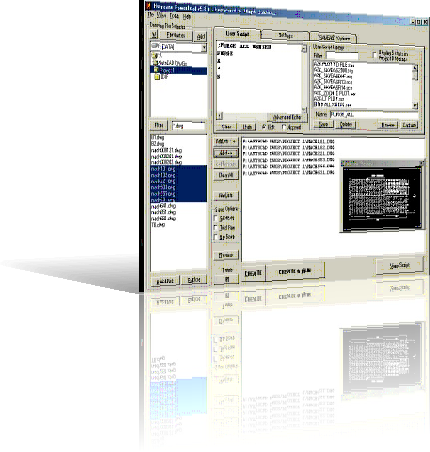
Streamline your AutoCAD workflow with Hurricane. Our batch script generator automates batch plot, batch edit, title block updates, and more across hundreds of DWG files in 3 clicks or less. Trusted by architects, engineers, manufacturers, and CAD teams. Watch video tutorials to get started.
Download Free Trial - No Time Limit and start saving time today.

Read more Hurricane testimonials

Why Choose Hurricane for Autodesk® AutoCAD® Automation?

Eliminate repetitive tasks icon Eliminate time-consuming repetitive tasks.

Save time icon Save thousands of hours with Hurricane.

What Hurricane Users Say

Loading testimonial...

- Author

More testimonials  ·  Read customer case studies →

Hurricane AutoCAD batch script generator interface showing file list, script editor, and batch plot options

Hurricane interface preview

Some of our Customers:

  • 2LS Consulting
  • ABB
  • Acad-Plus
  • Adamson Associates
  • Adaptive Technologies
  • AECOM
  • AFI Cybernetics Corp.
  • AFW Americas Limited
  • Alliant Engineering Inc.
  • Allpax
  • AMA Consulting Engineers
  • AMEC Foster Wheeler
  • Amels BV
  • Andy J. Egan Co.
  • Arcadis Australia Pacific
  • ATS Ohio
  • Auburn University
  • AZCAR
  • Baisch Engineering
  • BASF
  • Baxter Healthcare
  • Bayside Mechanical Inc.
  • BECA
  • Behlen Mfg. Co.
  • Biggs Cardosa Assoc. Inc.
  • BP
  • BSI Engineering
  • C.F. Poeppelman/PEPCON
  • Cadnetics
  • CANA High Voltage
  • Champion Technologies
  • City of Mesa - ITD
  • Corning Incorporated
  • Craig & Rhodes Pty Ltd.
  • Conway Engineering
  • Cooper Aerial Surveys Co.
  • Core Consultants
  • Curtins Consulting Ltd.
  • Dahlen Systems Inc.
  • Decad Asia Inc.
  • US Department of Treasury
  • Desco Ltd.
  • Dominion Technologies
  • Drawn In
  • ECG Engineering
  • EXP Engineering International
  • FATA Automation
  • Feiro Engineering Inc.
  • Fluid Quip Process Technologies
  • FMC Technologies
  • Fox Network
  • General Electric
  • GE Healthcare
  • GE Oil & Gas Inc.
  • GE Power Systems - ATL
  • Glasstech Services Inc.
  • Glenmount Global Solutions
  • H.L. Turner Group Inc.
  • Henshaw USA
  • Highlight Industries Inc.
  • Houston Interests
  • Hunt Guillot & Associates
  • Hyder Consulting Ltd.
  • ICA Automation
  • ICM Inc.
  • INTEC Automated Controls
  • International Matex Tank Terminals
  • KATZEN International Inc.
  • Kimco Realty
  • John Zink Co.
  • Kleven Verft
  • Kohn Partnership Architects Inc.
  • Korda/Nemeth Engineering
  • KUKA Assembly and Test
  • Lauren Engineers
  • Lawrence Berkeley National Lab
  • LTK Engineering Services
  • Lubrizol
  • March Consultants Ltd.
  • Metro Transit - BLRT
  • Morrow-Meadows Corporation
  • Morse Engineering Ltd.
  • Mott MacDonald Ltd
  • MStruct Engineering PLLC
  • Myklebust Verft AS
  • NASA
  • NBC Universal
  • Pacific Northern Gas
  • Parker Walter Group Inc.
  • Phillips Smith Conwell Architects
  • Portland Europe
  • PPG Industries
  • Pro Engineering Consulting Inc.
  • QBS
  • RAMSYS GmbH
  • River Consulting LLC
  • Ross & Baruzzini
  • SAGE Automation
  • Schneider Electric
  • Sellick Consultants
  • SHI International Corp.
  • SPSI
  • Stantec
  • Steel Detailing Inc.
  • Stonebridge Technical Services
  • Structural Tech Corporation Ltd.
  • Studio Link-Arc
  • Taylor Design
  • Tetra Tech Inc.
  • TechnipFMC
  • Texas Instruments
  • Unity-SI
  • Universal Orlando Resort
  • Veneklasen Associates
  • Walsh Construction Company
  • WB Services LLC
  • Western Washington University
  • WGPM Inc.
  • Whelans Pty Ltd.
  • Williams Partners
  • Zev Cohen and Associates Inc.
  • + Tens of thousands of independent AutoCAD professionals

Trusted by engineers & CAD teams at

What You Can Automate in AutoCAD with Hurricane

AutoCAD Batch Script Creation

Create batch scripts to process multiple AutoCAD drawings with custom commands.

AutoCAD Workflow Automation

Optimize workflows for AutoCAD Electrical, Mechanical, and Architectural.

AutoCAD DWG Batch Rename

Batch rename DWG files with renumbering and text replacement.

Dynamic Tags

Definable Tags for dynamic data in scripts.

Command Capture

Command Capture Utility to record AutoCAD commands.

Drag and Drop

Drag and Drop files or directories into Hurricane.

AutoCAD Electrical Compatibility

AutoCAD Electrical .WDP project file compatibility.

Drawing Scan

Drawing Scan by AutoCAD DWG version.

Night Run

Night Run for scheduled batch scripts.

★ Free AutoCAD Reference Library ★

403
Commands
Rated

AutoCAD Commands List: 2000 to 2026

Every AutoCAD command rated for batch-script compatibility - which work at the command line, which need a hyphen prefix (-PURGE, -LAYER, -INSERT…), and which open dialog boxes that stall scripts. Updated through AutoCAD 2026 including the new -FIND command.

359
Variables
Charted

AutoCAD System Variables List: 2000 to 2026

Every system variable rated for scripting - the 6 KEY variables every batch script must set (FILEDIA, CMDECHO, EXPERT…), which are settable vs. read-only, and what was added or removed from AutoCAD 2000 through 2026.

Want it on one page? Grab the printable AutoCAD Batch Scripting Cheat Sheet →

Why CAD Teams Use Hurricane for AutoCAD Batch Processing

Seamless AutoCAD Integration

  • Non-Intrusive Operation: Runs without modifying AutoCAD settings or interfering with its functionality.
  • Version Flexibility: Compatible across AutoCAD versions (note: script syntax may vary).

It's a Trusted AutoCAD Tool

  • Proven by Experts: Trusted by architects, engineers, manufacturers, and CAD teams for dependable performance.
  • Secure and Private: Free of spyware, adware, or any monitoring, ensuring your data stays safe.

Flexible Batch Script Processing

  • Straightforward Data Storage: Uses plain text files, eliminating complex databases.
  • Easy Installation: Flexible network or local setup with no special configuration.
  • Customizable Licensing: Username, PC, USB, or Enterprise licensing to suit your needs.

Real Life Scenarios: Hurricane in Action

400 drawings due for submittal

Insert signature block, batch plot, bind xrefs, and export DXF for consultants - all in one session. What used to take days is done in hours.

300 drawings, rev text changed

Use Hurricane's Search and Replace Text Wizard to update every instance across all drawings automatically.

378 drawings, 5 different scripts

Assign different routines to different files in one session: plot some, purge others, update title blocks. Saves half a week or more on large projects.

1500+ drawings, date in title block

Change a date in the title block across 1500 drawings. Hurricane's Title-Block Update Wizard does it in minutes of setup plus machine processing - vs 50+ hours manually.

200 drawings for consultants

Need one hard copy and one bound soft copy? Run batch plot and bind routines. Start the run and let Hurricane handle it while you focus on other work.

400+ drawings, format conversion

Convert hundreds of older DWG files to a newer version. Hurricane processes the batch overnight so the team is ready the next morning.

Hurricane vs. Other AutoCAD Batch Tools

Switching from ScriptPro or MultiBatch? Considering AutoCAD's built-in batch plotting, or doing it by hand? Here's how Hurricane compares.

Feature Hurricane AutoCAD Built-in Batch Plot MultiBatch Doing It Manually
Batch plotting ✓ ✓ ✓ One at a time
Title block update wizard ✓ ✗ ✗ Open each file
DWG batch rename ✓ ✗ ✗ Error-prone
Search & replace text in drawings ✓ ✗ ✗ Open each file
Custom script wizards ✓ ✗ ✗ Write code from scratch
Dynamic tags in scripts ✓ ✗ ✗ Not possible
Works with AutoCAD LT ✓ ✗ ✓ ✓
BricsCAD / IntelliCAD support ✓ ✗ ✗ ✓
Night run / scheduled batch ✓ ✗ ✗ Stay late
Active support & updates ✓ since 2003 Limited Discontinued -

Hurricane is the only actively developed and supported AutoCAD batch automation tool - trusted by thousands of CAD professionals since 2003.

Simple, One-Time Pricing

No subscription. No recurring fees. Buy once, use forever. Why one-time? →

Single Seat

For individual CAD professionals

One-Time

Perpetual license · Free updates · No subscription

  • ✓ Full Hurricane feature set
  • ✓ Free minor version updates
  • ✓ Email & forum support
  • ✓ PC, username, or USB key license
  • ✓ Most users recoup the cost in their first session
Buy Now
MOST PORTABLE

USB Portable

License lives on your USB stick

One-Time

Perpetual license · Free updates · No subscription

  • ✓ Everything in Single Seat
  • ✓ Hurricane runs from the USB drive
  • ✓ Use on any PC - no installation
  • ✓ License tied to the USB stick, not the PC
Buy USB Portable

See how fast Hurricane pays for itself - try the ROI Calculator →

Not sure yet? Download Free Trial - No Time Limit - no credit card required.

AutoCAD Automation Guides

All AutoCAD automation guides →

AutoCAD Batch Scripting FAQ

What is Hurricane?

Hurricane is an AutoCAD batch script generator and productivity tool. It automates repetitive tasks like batch editing, batch plotting, title block updates, and DWG file management. You can batch edit hundreds of AutoCAD drawings in 3 clicks or less.

Which AutoCAD versions does Hurricane support?

Hurricane is compatible with AutoCAD 2026 and all prior versions, including AutoCAD LT. It also works with BricsCAD, IntelliCAD, and DraftSight.

What can I automate with Hurricane?

Hurricane automates batch editing, batch plotting, title block updates, purge operations, search and replace text, DWG batch renaming, and more. Built-in wizards include Title-Block Update, Purge, Search and Replace Text, and PageSetup. See the Hurricane batch edit and batch plot FAQ for more.

How do I run a script on multiple AutoCAD drawings?

AutoCAD's SCRIPT command only runs a .scr file on the current drawing. Hurricane runs the same script on a whole list of drawings: add the DWG files or a folder, pick or paste your script, and click Create & Run. Hurricane opens each drawing, runs the script, saves and closes it, then moves to the next.

Can Hurricane run AutoLISP routines on many drawings?

Yes. Load the routine in your script with (load "MyRoutine.lsp"), then call it on the next line. Hurricane runs it on every drawing in the list. LISP needs full AutoCAD, or AutoCAD LT 2024 and later.

How quickly does Hurricane pay for itself?

Most users recoup the cost in their first session. One user saved over 50 hours on a single job processing 1,500 drawings. At typical CAD rates, that's thousands of dollars in time savings from a single afternoon of setup.